MNE Python
MNE Python is an excellent, open-source choice for EEG and MEG data visualization and analysis.
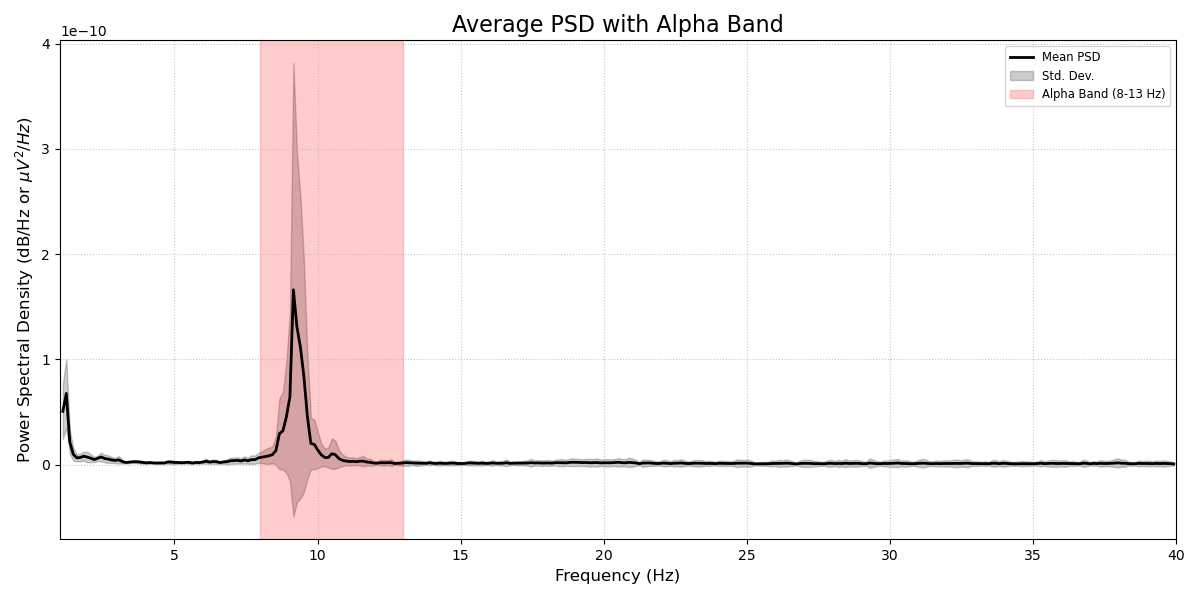
Power spectrum density in the alpha band.
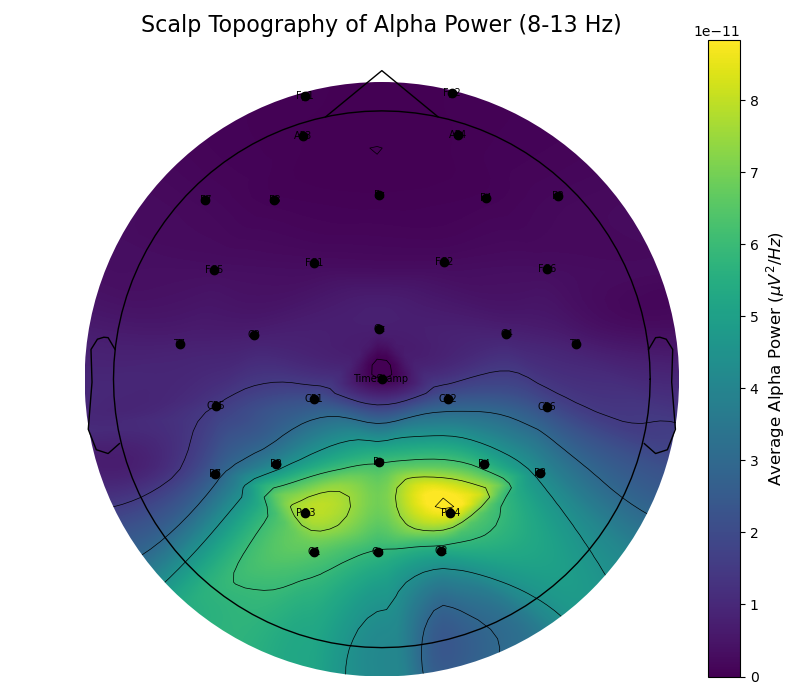
Topographic distribution of the alpha band.
Loading Mentalab data into MNE
CSV and BDF files
The below script can be used to create an MNE raw data object from a .csv or .bdf file recorded with Explore Desktop.
For CSV, the MNE object is created from a simple pandas data frame.
Reading .bdf files uses the BDF file loader provided by MNE.
XDF files
The function can also be used to read in an .xdf file recorded with LabRecorder, relying on the pyxdf library.
Loading .xdf files selects the first stream in the file by default.
Change it by adjusting the stream_num variable.
Make sure to select the correct ExG stream, as there may be several ExG, ORN, and Marker streams in one .xdf file.
BIN files
To load a Mentalab binary *.BIN file taken from the amplifier’s flash memory, convert it to .csv or .bdf using Explore Desktop first:
File > Convert BIN
Then continue with the function below.
In all cases, the function will automatically determine the number of channels, channel names, and sampling rate for you.
| Mentalab ExG data is always recorded raw. After creating the MNE raw object, you have free choice of processing in terms of filtering, artefact rejection, and so on. |
###########################
### Mentalab MNE Loader ###
###########################
# The below script can be used to create an mne raw data object
# from a csv or bdf file recorded with Explore Desktop,
# or an xdf file recorded with LabRecorder.
#
# Loading xdf files selects the first stream in the file by default.
# Change it by adjusting the stream_num variable.
# Make sure to select the correct ExG stream, as there may be several ExG,
# ORN, and Marker streams in one xdf file.
#
# To load a Mentalab binary (*.BIN) taken from the amplifiers flash memory,
# convert it to csv or bdf using Explore Dekstop (File > Convert BIN) first
# and then continue with the below function.
import pandas as pd
import pyxdf
import mne

def mne_load_mentalab(file_name):
    # CSV
    if file_name.split('.')[1] == "csv":
        print(f"Creating mne raw object from csv.")

        file_name_root = file_name.split('.')[0][:-4]
        sampling_freq = pd.read_csv(file_name_root + '_Meta.csv', delimiter=',')['sr'][0]

        data_frame = pd.read_csv(file_name, delimiter=',')

        # Save the first timestamp to align markers before dropping the column
        t0 = data_frame['TimeStamp'].iloc[0]

        data_frame = data_frame.drop('TimeStamp', axis = 1)
        n_channels = len(data_frame.columns)
        ch_types = ["eeg"] * n_channels
        ch_names = list(data_frame.columns)

        info = mne.create_info(ch_names=ch_names,
                            sfreq=sampling_freq,
                            ch_types=ch_types)
        # convert from muVolt to Volt because MNE expects data in Volt units
        data_frame = data_frame.div(1e6)
        data_frame = data_frame.transpose()
        raw_data = mne.io.RawArray(data_frame, info)

        marker_file = file_name_root + '_Marker.csv'
        if os.path.exists(marker_file):
            markers = pd.read_csv(marker_file, delimiter=',')

            # MNE expects relative onset times in seconds starting from 0
            onsets = (markers['TimeStamp'] - t0).values
            descriptions = markers['Code'].astype(str).tolist()

            # Default duration is 0 for point-in-time event markers
            annotations = mne.Annotations(onset=onsets, duration=0, description=descriptions)
            raw_data.set_annotations(annotations)
            print(f"Loaded {len(descriptions)} markers from {marker_file}.")

        return raw_data

    # BDF
    elif file_name.split('.')[1] == 'bdf':
        print(f"Creating mne raw object from bdf.")

        raw_data = mne.io.read_raw_bdf(file_name)

        return raw_data
    # XDF
    elif file_name.split('.')[1] == 'xdf':
        streams, header = pyxdf.load_xdf(file_name)

        # THIS SELECTS THE FIRST STREAM
        # CHANGE INDEX TO SWITCH STREAM
        stream_num = 1
        print(f"Creating mne raw object from xdf. Selected stream: {stream_num}.")
        ch_names = []
        for x in streams[stream_num]['info']['desc'][0]['channels'][0]['channel']:
            ch_names.append(x['name'][0])
        data = streams[stream_num]["time_series"].T

        n_channels = data.shape[0]
        sampling_freq = float(streams[stream_num]["info"]["nominal_srate"][0])
        # convert from muVolt to Volt because MNE expects data in Volt units
        data *= 1e-6  # uV -> V
        info = mne.create_info(ch_names, sampling_freq, ["eeg"] * n_channels)
        raw_data = mne.io.RawArray(data, info)

        return raw_data

# Usage example calls
raw_data = mne_load_mentalab("data/8channel_ExG.csv")
raw_data = mne_load_mentalab("data/16channel_ExG.bdf")
raw_data = mne_load_mentalab("data/32channel_ExG.xdf")
Having loaded your data, you can now filter your data to taste and use raw_data.plot() to inspect your recording.
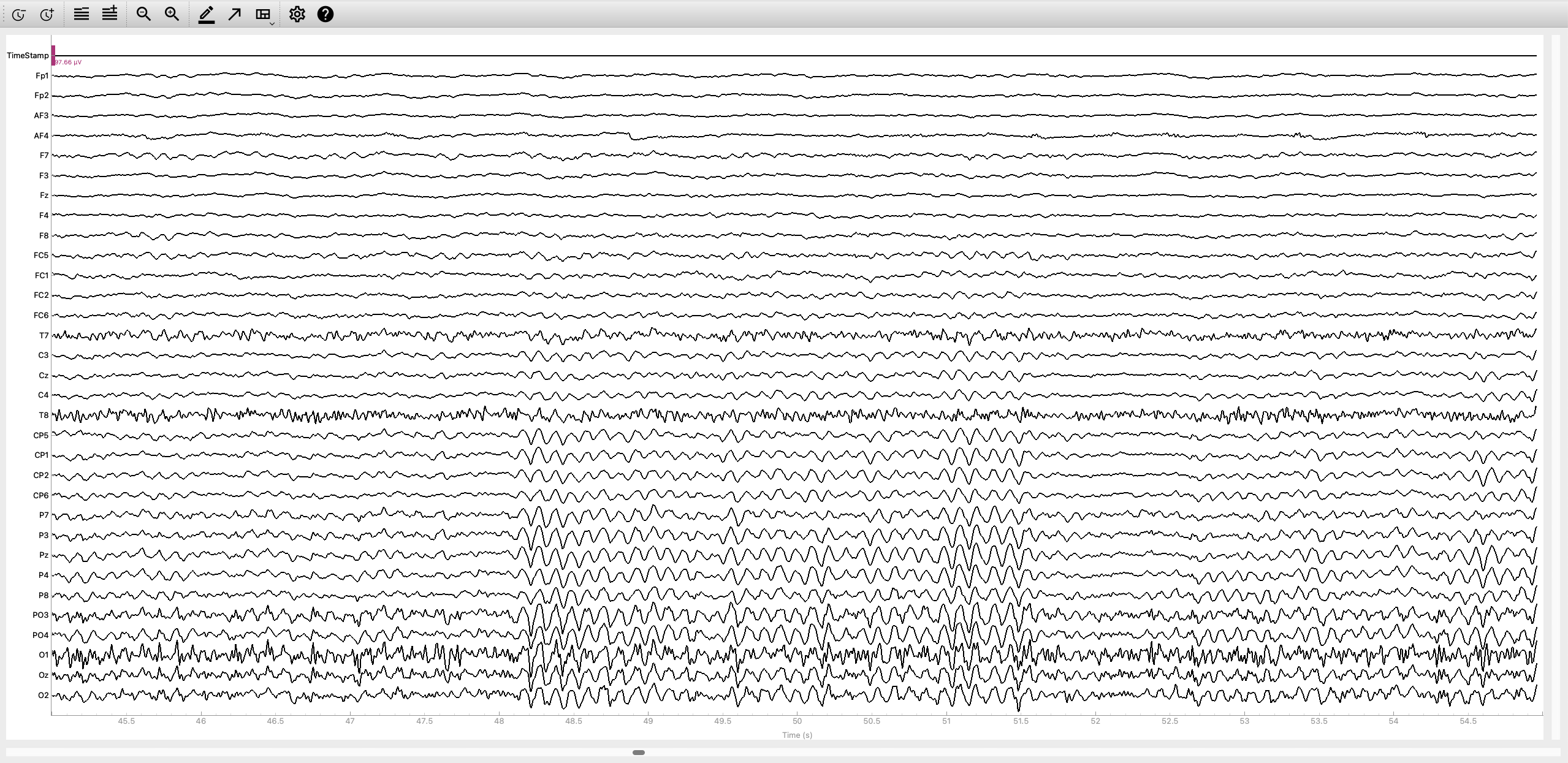
MNE data inspection.
MNE provides excellent tutorials for further data processing.
For more information or support, contact support@mentalab.com.